


When you purchase items on a shopping platform and obtain a Courier Tracking Number, please must input the Courier Tracking Number on our official website in advance. This is because the information on the parcel waybill may be hidden or unclear, and to prevent the parcel from being warehoused as an ownerless parcel, forecasting is mandatory.

Before forecasting a parcel, ensure you are logged in to our official website, then click "User Center" at the top of the webpage to enter the membership page.
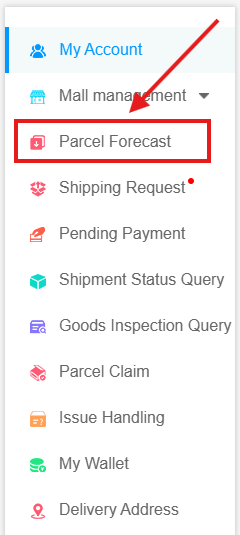
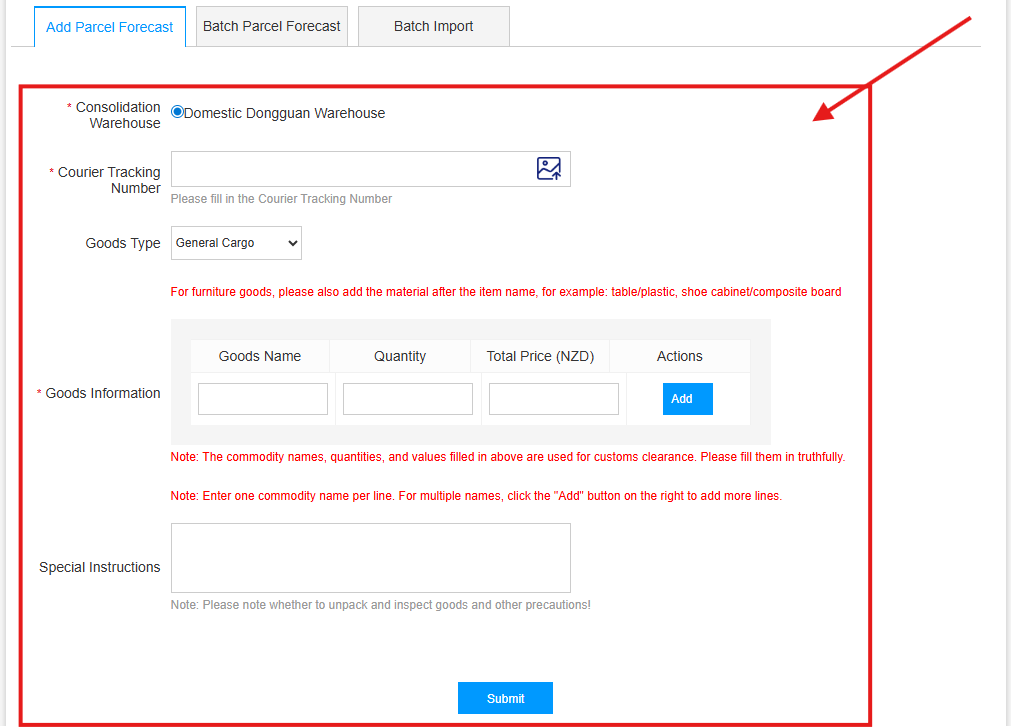
Next, click "Parcel Forecast" on the left side of the webpage, then fill in the Courier Tracking Number, Goods TypeGoods Name, Quantity, Total Price (NZD) provided by your shopping platform as per the page requirements. If your parcel contains multiple items, click "Add" to fill in multiple items. After completing all parcel information, click the "Submit" button to submit. A "Operation Successful! " prompt will appear upon successful submission.


Thereafter, you can click "User Center" at the top of the webpage to enter the membership page, then click "All Parcels" to view parcel information that has completed "Pre-Arrival Notification".
Tips: Other ways to view parcel information that has completed "Pre-Arrival Notification":

Option 1, Click the "Pending Arrival" icon in the middle of the membership page.
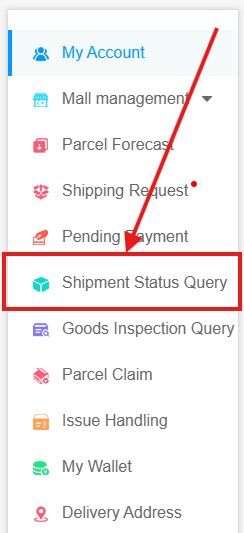
Option 2, Click the "Shipment Status Query" on the left side of the webpage.
Both can display the status information of parcels that have completed "Pre-Arrival Notification".



 在线客服
在线客服